The IDE for code your agent writes.
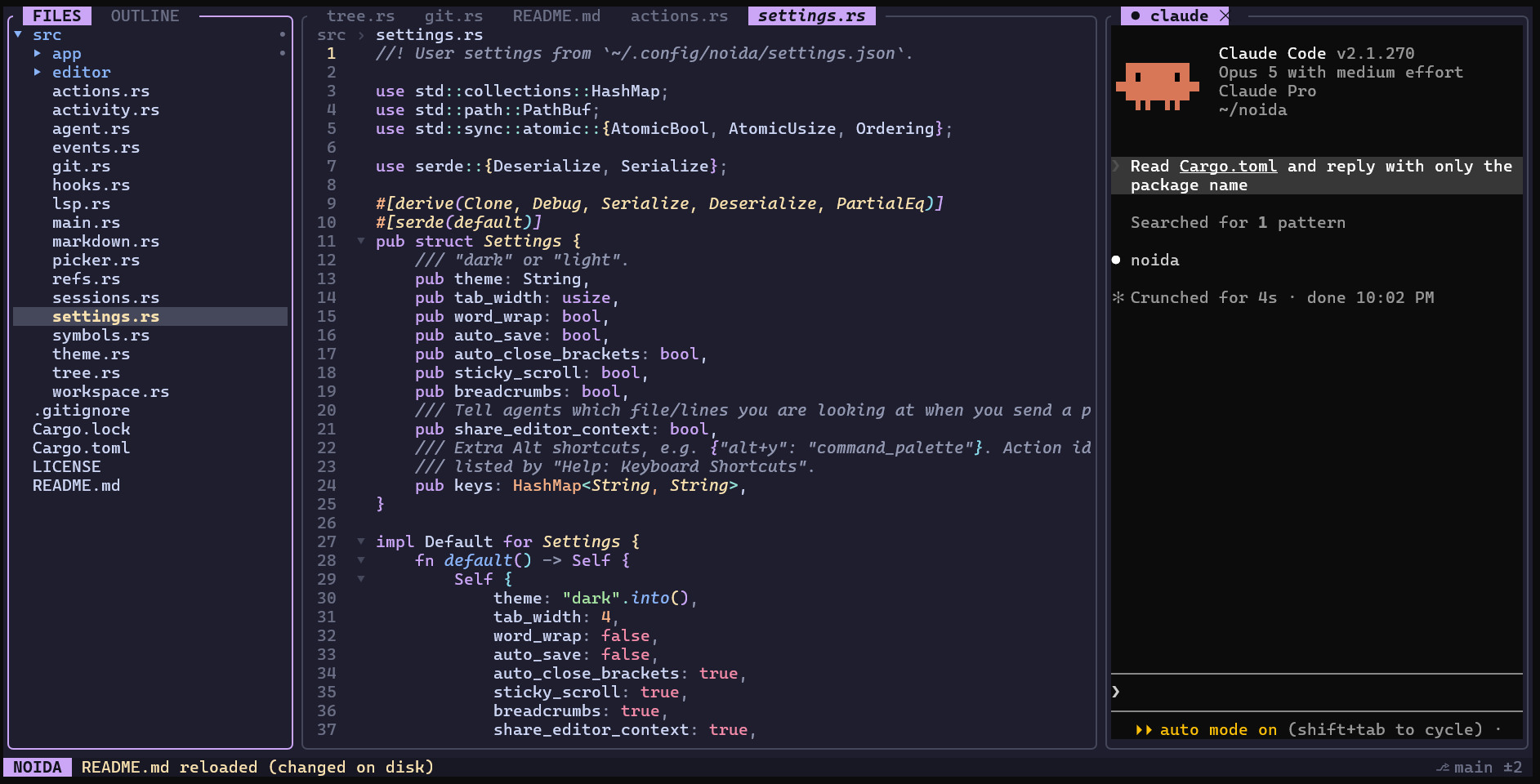
NOIDA puts a file tree, a real editor, LSP and git review next to your actual Claude Code or Codex session, in your terminal. Every file:line the agent prints opens with one click.
~20 MBof memory, one native binary.
No Electron.
click a path in the agent pane
Alt+s send selection to the agent
The loop you run fifty times a day, in seconds.
Your agent writes and explains. You read, check and steer. NOIDA removes the alt-tabbing between the two.
- 1
Ask
Your real
claudeorcodexruns in a pane, with your login, MCP servers and slash commands. - 2
Click
Paths,
#L10-20ranges and symbol names in the answer are links. Alt+j labels them for the keyboard. - 3
Read
The tree expands, the editor jumps to the line, and definitions and references are one key away.
- 4
Send back
Select lines and press Alt+s.
@file#L87-90lands in the agent's prompt.
Leave the heavy IDE closed.
If your day is mostly "agent writes, you review", this covers what you were opening VS Code for, plus the parts it was never built to do.
The editor features you'd miss
- Language servers: go to definition, references, rename across files, hover, quick fixes, format
- Multi-cursor with Ctrl+D, column selection, regex find and replace
- Workspace search and replace with a preview of every change
- Tree-sitter outline, breadcrumbs, sticky scroll, folding, Markdown preview
- File tree operations, fuzzy open, command palette, split editor, tabs
- Git gutter, staged view, commit log and file history, custom keybindings
What an IDE doesn't do
- Review every hunk the agent changed, then accept it into git or reject it from disk
- Know what the agent is doing: working, finished or waiting for permission, with a timeline of reads, edits and commands
- Share what you're looking at: the agent is told your open file and selection when you prompt
- Run many sessions, like VS Code: a new session is one click away, tabs are named after the conversation, and past conversations can be read and resumed
- Race or pair agents: run Claude and Codex side by side, send both the same prompt, compare their changes, or isolate one in a git worktree
- No extensions and no debugger, on purpose. The terminal still does the rest.
Install in a minute.
Download a binary for Linux or macOS from the latest release, or build from source with Rust 1.88 or newer. NOIDA adds a tab for each agent CLI it finds on your PATH.
Binaries: Linux x86_64 (a static build for any distro, and one for Ubuntu 22.04+) and macOS for Apple Silicon and Intel, each with a checksum. They're built in the open on GitHub Actions; the Intel Mac build hasn't been run by anyone yet. macOS binaries are a plain .tar.gz, not a .dmg, and aren't signed by Apple yet, so the first run may be blocked: xattr -d com.apple.quarantine noida clears it.
On a Mac, set your terminal's Option key to act as Alt, or press Ctrl+] before any shortcut. The README has the setting for each terminal.
Where it's heading.
NOIDA is an early preview, moving fast. Here's what has shipped and what comes next.
-
Foundation shipped
- Real agent CLIs, sessions and resume
- Clickable file and symbol references
- Hook-based status, activity and handoff
- Hunk-by-hunk review, worktree agents
- LSP and tree-sitter code intelligence
- Multi-cursor editor, workspace search
-
Editor and agent depth shipped
- Split editor, custom keybindings, Ctrl+Shift shortcuts
- Find and copy inside agent panes
- Git staged view, log and file history
- Editor context shared with agents
- Changed files per agent, compare agents
- New sessions, named tabs, conversation history
-
First release v0.1 alpha, shipped
- Prebuilt Linux and macOS binaries
- CI on Linux and macOS
- Verified with rust-analyzer, TypeScript 7 and Pyright
- Smoke-test checklist for every release
-
Next
- Hands-on testing in Mac terminals
- Homebrew tap
- Signed and notarized macOS binaries
- Polish from early feedback
-
Later
- Remote projects over SSH
- Project map for monorepos
- Task board across agents
- Optional local model for cheap context work
Before you try it.
It's alpha
Used daily on Linux and WSL2 with Claude Code, Codex and rust-analyzer. CI builds and tests every commit on macOS too, but hands-on Mac use is still limited.
Your agent stays yours
NOIDA runs the real CLI and adds its hooks per session. Your Claude and Codex config files are never modified.
Free and open
MIT licensed, and built and released on GitHub's free infrastructure for public projects. No account and no paid tier.
Commit before rejecting
Rejecting a hunk reverts it on disk. Destructive actions ask twice, but git is your undo.